Why Your Social Security Analysis Needs an XML File, Not a PDF
When you open your Social Security Statement at ssa.gov/myaccount, you are offered two downloads. One is a PDF. The other is your Statement data as an XML file.
The PDF is the one that looks the way a document is supposed to look.
For reading, that is the right choice. For running a claiming analysis, the PDF is missing something, and the PDF itself tells you it is missing.
What the PDF leaves out
Scroll to the earnings section of your own PDF statement. If you have a long earnings history, SSA tells you there that your earlier years have been combined, and points you online for the complete record.
That is not a formatting quirk. It is the entire problem.
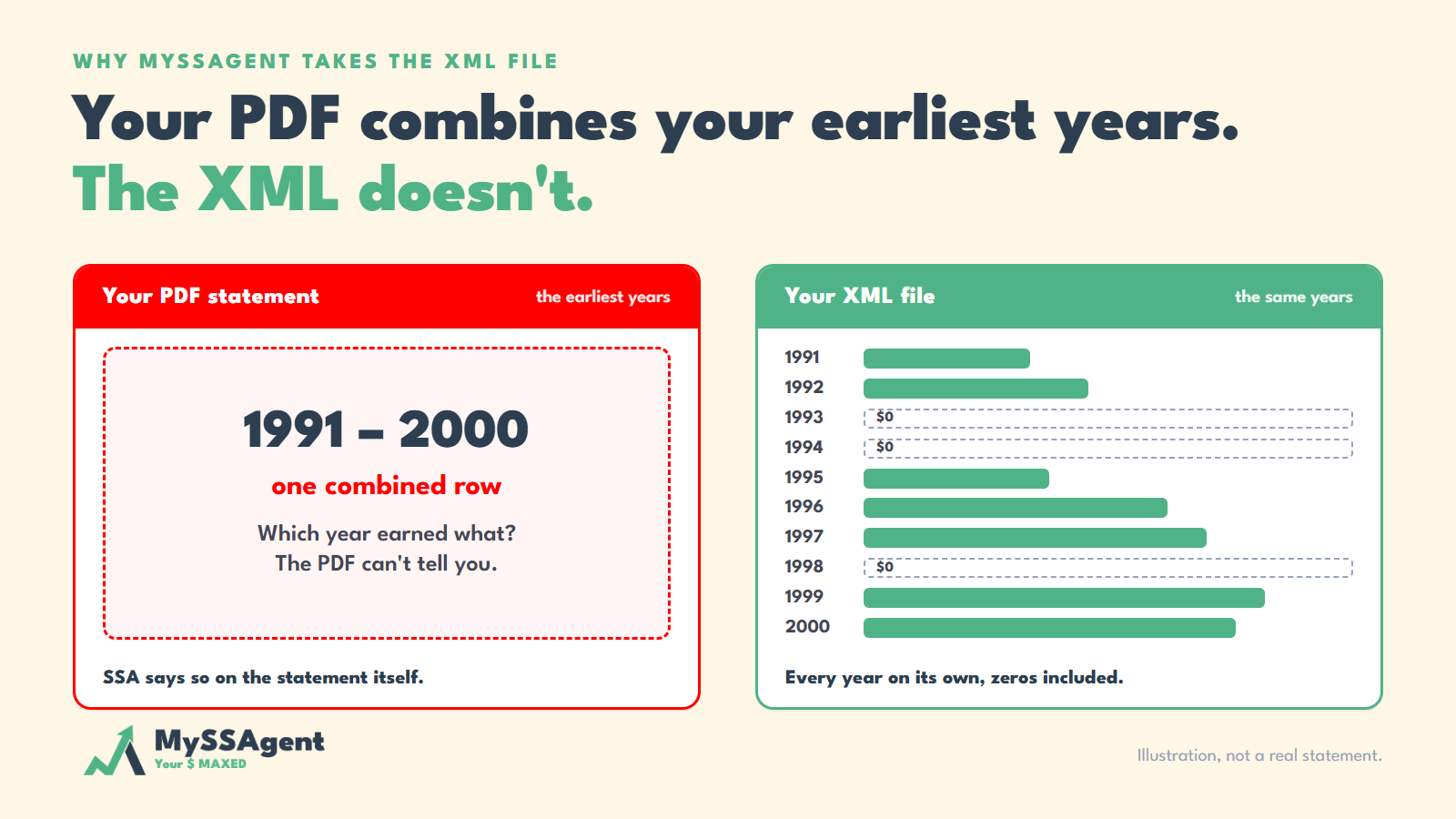
The PDF renders your early earnings as ranges. On the statements we checked, one row covered 1991 through 2000 with a single total beside it. The XML lists every one of those years separately, each with its own amount.
We checked this on three real statements, with the PDF and the XML downloaded from the same account each time. On all three, the years from 2006 onward printed one-by-one, and everything earlier was folded into a few combined rows. In the XML, each of those earlier years was its own entry. Every combined total matched the sum of the individual years exactly, which confirms the aggregation rather than assuming it.
Why one combined row breaks the math
Social Security does not average your earnings. It takes your highest 35 years of indexed earnings, and each year carries its own index factor tied to national wage growth in that year. A dollar earned in 1978 is not treated as a dollar earned in 2008.
So the calculation needs to know which year the money was earned. A combined row is precisely the destruction of that information.
The zero-year problem
This is where it gets expensive.
Suppose a combined row on your statement reads 1974 to 1983, total $61,000. Two very different working lives produce that number.
One is ten steady years of about $6,100. The other is a single strong year of $61,000 followed by nine years of zero.
Those two histories index differently, land differently in the top-35 set, and produce different benefits. Read from the PDF, they are indistinguishable. Spreading the total evenly across the range invents earnings in years that were actually zero, which lifts the average and makes the resulting estimate too high. An error that flatters the client is the worst kind, because nobody questions it.
Zero years are common. Anyone who raised children, went back to school, moved countries, took a business loss, or spent a stretch out of work has them. They belong in the calculation as zeros, individually, in the years they actually happened. Our post on how zero years shrink a business owner's benefit covers what they do to the number.
When a zero is not really a zero
Some zero years are wrong.
We worked with a client whose record showed several zero years. He had been working in every one of them. Those earnings never reached his Social Security record, and fixing it meant him, his accountant and SSA working through the file together.
No one catches that on a PDF. Inside a combined row, a missing year just makes the total a little smaller, and nothing on the page tells you why. In the XML, that year sits on its own line with a zero beside it, where anyone who knows the client's work history can see it.
This is not a fringe problem. When the name and Social Security number on a W-2 do not match SSA's records, the wages go into what SSA calls the Earnings Suspense File instead of onto anyone's record. As of July 2023, SSA's Inspector General reported that the file had accumulated $2.15 trillion in wages and more than 405 million wage reports, covering tax years 1937 through 2022. SSA does not use wages in that file to decide anyone's benefit until they are matched back to the right person's record.
Timing matters as well. SSA can ordinarily correct an earnings record up to three years, three months and 15 days after the year the wages were paid. After that, corrections are still possible in specific cases, such as wages an employer reported that never reached the record, or matching a tax return that was filed. The request goes in on Form SSA-7008, and it rests on paperwork: W-2s, pay stubs, tax returns. The sooner someone reads the record year by year, the easier that paperwork is to find.
Why a better parser does not fix this
Worth being precise here, because the usual explanation is wrong.
The SSA statement PDF is not a scan. It has a clean text layer, and the numbers extract from it cleanly. Reading the document is not the difficulty.
The difficulty is that the information is not in the document. No software recovers a year attribution that was never printed. A flawless parser still returns a degraded input.
The failure is also silent. If we accepted a PDF, we could not tell you how far off your number was, because what sits inside a combined block is unknowable. For an engine whose value is precision, an input we cannot put an error bar on is disqualifying.
What we do instead
MySSAgent takes the XML, so the year-by-year record arrives exactly as SSA holds it.
From there, the claiming math is deterministic, which means it follows SSA's published rules rather than estimating. The rules are the same for everyone. The answer is not, because the inputs are yours: every year of your earnings, your date of birth, and the claiming ages you are comparing. Nothing is filled in from an average or a typical worker.
Deterministic also means repeatable. Run the same record twice and you get the same answer, and the report shows which rule was applied at each step and how the arithmetic ran, so it can be checked. Our chat assistant uses a language model. The claiming calculation does not, and that distinction matters when the output is a decision you cannot reverse.
Keep your PDF as well
The PDF carries one thing the XML does not, and it is important.
Printed on that statement is a disclosure that SSA's estimates assume you stop working and earn nothing further until you claim.
If you intend to keep working, every estimate on the page is answering a question you did not ask. Earned income before full retirement age can also cause SSA to withhold benefits in whole-month blocks, which surprises people who were told only that the rule exists. Our post on the earned income test explains how it lands.
How to get your XML file
It takes about five minutes.
- Log in to your my Social Security account at ssa.gov/myaccount. First-time users verify their identity, so have a phone or email ready.
- Open "Your Social Security Statement" from your dashboard.
- Choose "Download your Statement Data as an XML file." It saves with a .xml extension. Upload that to MySSAgent.
What the XML file contains
- Your earnings record, every year listed on its own
- Date of birth
- Your full retirement age
- SSA's own benefit estimates for each age from 62 through 70
- No Social Security number. The schema has no field for one, so there is nothing of the kind for us to collect.
Worth rechecking if your last analysis is old
The Social Security Fairness Act (P.L. 118-283), signed January 5, 2025, repealed the Windfall Elimination Provision and the Government Pension Offset, effective for benefits payable from January 2024. Teachers, firefighters, nurses and other public-sector workers were affected by both. Any estimate produced before that law reflects offsets that no longer apply.
The bottom line
A claiming decision is hard to undo, and the benefit it sets is paid for the rest of your life. A decision like that deserves an input you can stand behind.
The XML download gives you your record as SSA keeps it, year by year, including the years you earned nothing and any year that shows a zero when it should not.
Five minutes to download. Then the math has something solid underneath it.
Sources & citations
- SSA.gov, Social Security Statement XML schema and developer documentation
- SSA.gov, your Social Security Statement, earnings record section
- SSA Office of the Inspector General, "The Social Security Administration's Major Management and Performance Challenges During Fiscal Year 2023", 022330 (November 2023)
- SSA.gov, Social Security Handbook §1423, Time Limit for Correcting Earnings Records
- SSA.gov, Form SSA-7008, Request for Correction of Earnings Record
- SSA.gov, Benefits Planner: Receiving Benefits While Working
- Social Security Fairness Act, P.L. 118-283 (signed January 5, 2025)
Related reading
- How to Download Your Social Security Statement (XML)Twelve screenshots from ssa.gov sign-in to the XML file — the earnings record every analysis starts from.
- Set Up the MySSAgent Browser ExtensionOne click pulls your earnings record from your my Social Security account. No SSN entered, nothing typed by hand.
- Your SSN Is Safer Than You ThinkWhat a Social Security analysis needs from you, what it never needs, and why the XML file contains no SSN.
- The Last 4 Digits Myth: Why Partial SSN Sharing Is Still a Full RiskSSN Files, Part 3 — “just the last four” feels safe. Statistically, it is not.